
Download Sudowrite – AI Writing Assistant for Creatives
Overview of Sudowrite
Sudowrite is a next‑generation AI writing assistant specifically crafted for novelists, screenwriters, and any creative professional who lives in the world of fiction. Powered by OpenAI’s GPT‑3 engine and enhanced with proprietary pre‑ and post‑processing layers, Sudowrite can generate fresh story material, expand existing passages, or rewrite text to meet precise stylistic criteria. Unlike more general‑purpose content generators such as Jasper or NovelAI, Sudowrite zeroes in on narrative storytelling, offering tools that feel like an imaginative collaborator rather than a generic copy‑paster.
Whether you’re battling writer’s block, looking for a fresh plot twist, or need to polish dialogue, Sudowrite delivers suggestions that stay true to your voice while injecting new ideas. The platform is web‑based, meaning you can access it from any modern browser on Windows, macOS, Linux, or even mobile devices. Security is taken seriously; all user data is encrypted in transit, and the service adheres to GDPR‑compliant privacy practices.
While the AI is remarkably capable, it is not infallible—occasional duplication can arise if source material from a well‑known work is fed directly into the system. Overall, Sudowrite positions itself as a reliable, creative partner that helps writers move from concept to manuscript faster, with fewer dead ends and more inspiration.
Key Features that Set Sudowrite Apart
- First Draft Generator: Input a brief premise or character sketch and receive a polished 1,000‑word opening that respects your intended tone and genre.
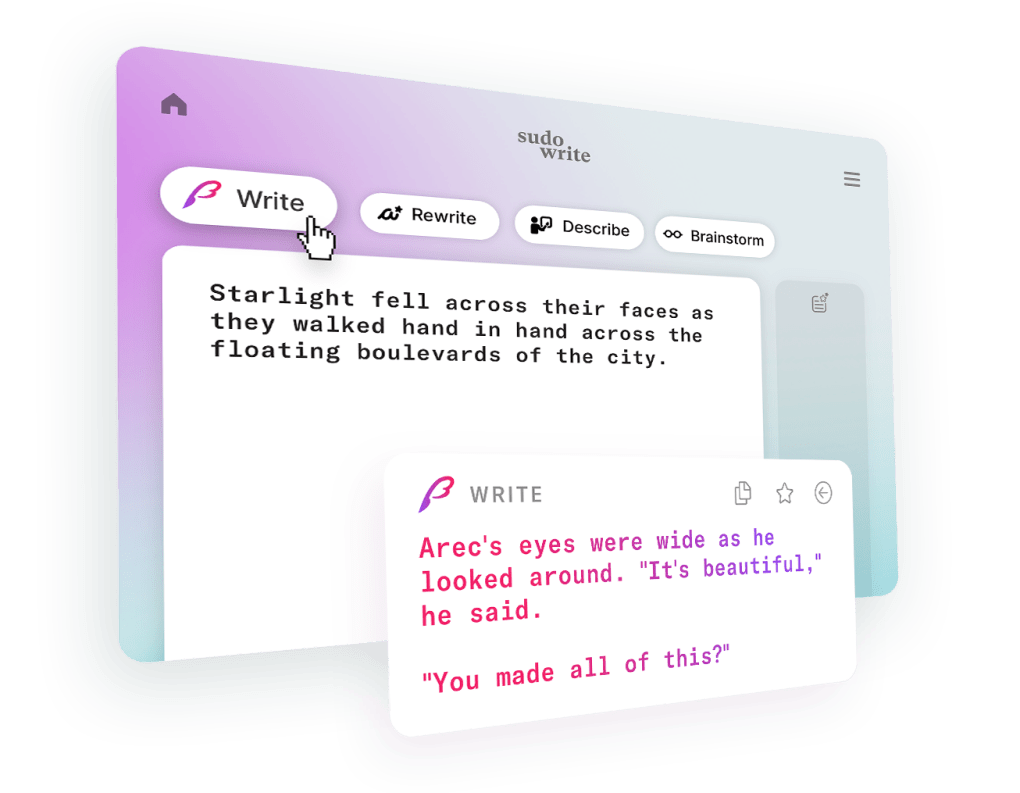
- Write‑On‑Demand: Highlight a paragraph, click “Write,” and Sudowrite will continue the narrative, matching the style, pacing, and voice of the surrounding text.
- Rewrite & Refine: Feed any block of prose and get multiple rewrite options that improve flow, tighten dialogue, or adjust emotional intensity.
- World‑Building Toolbox: Generate detailed setting descriptions, cultural customs, and lore snippets to enrich the backdrop of your story.
- Character Development Helper: Prompt Sudowrite with a character’s motivations and receive dialogue snippets, inner monologue, or back‑story ideas.
- Style‑Consistency Analyzer: The AI learns from your existing manuscript, ensuring new content aligns with established narrative voice and pacing.
- Safety Filters: Built‑in content filters reduce the risk of offensive or copyrighted material slipping into generated text.
- Collaboration Mode: Share a live editing link with co‑authors, allowing real‑time AI assistance without leaving your preferred writing platform.
- Export Options: Download generated sections as plain text, rich text, or directly into Google Docs, Scrivener, and Microsoft Word.
- Regular Updates: Sudowrite receives monthly model refinements, expanding its creative repertoire and improving accuracy.
Installation, Setup, and Compatibility
Sudowrite is delivered as a cloud‑based web application, which eliminates the need for complex local installations. To get started, follow these steps:
- Create an Account: Visit Sudowrite.com and sign up using an email address or single‑sign‑on options like Google or Apple ID.
- Select a Plan: Choose between the free trial (limited to 5,000 generated words) or one of the subscription tiers (monthly or annual). All plans include secure SSL encryption.
- Verify Email & Set Preferences: Confirm your email, then head to the “Settings” page to set your preferred language, default genre, and tone presets.
- Integrate with Your Writing Tool: Install the official browser extension (available for Chrome, Edge, and Firefox) to bring Sudowrite’s “Write” button directly into Google Docs, Microsoft Word Online, or Scrivener’s web view.
- Start Generating: Highlight any text block, click the Sudowrite icon, and select the desired action (First Draft, Rewrite, Expand, etc.). The AI response appears in a side panel, ready to be accepted, edited, or discarded.
Compatibility: Because Sudowrite runs in the browser, it works on any operating system that supports modern web standards, including Windows 10/11, macOS Catalina and later, Linux distributions (Ubuntu, Fedora, etc.), as well as iOS Safari and Android Chrome for on‑the‑go writing sessions. The browser extension is compatible with Chrome 112+, Edge 112+, and Firefox 115+.
Performance is optimized for both desktop and mobile connections. Users on slower networks may experience a brief latency of 2‑4 seconds per request, but the system’s asynchronous processing ensures you can continue typing while the AI works in the background. For power users, Sudowrite also offers an API key (available on the Enterprise plan) to integrate AI assistance into custom pipelines, IDEs, or publishing platforms.
Pros and Cons – Quick Verdict
Pros
- Specialized for creative fiction, offering genre‑specific suggestions.
- First Draft feature jump‑starts new projects with coherent, engaging openings.
- Style‑consistency analyzer learns from your manuscript, preserving voice.
- Web‑based platform eliminates heavy local installations.
- Cross‑platform compatibility (Windows, macOS, Linux, iOS, Android).
- Robust safety filters reduce risk of offensive or copyrighted output.
- Regular model updates keep the AI fresh and innovative.
- Collaboration mode streamlines co‑author workflows.
Cons
- Subscription cost may be prohibitive for hobbyists on a tight budget.
- Occasional duplication risk when feeding well‑known source material.
- Dependent on internet connection; offline usage is not supported.
- Learning curve for optimal prompt crafting can be steep for beginners.
- Advanced API access is limited to higher‑tier plans.
Frequently Asked Questions
Can Sudowrite be used for non‑fiction writing?
While Sudowrite excels at fiction, it can still help with non‑fiction tasks such as brainstorming ideas, polishing prose, or generating illustrative anecdotes. However, tools like Jasper are generally more optimized for SEO‑focused, factual content.
Is my data safe and private?
Yes. Sudowrite uses end‑to‑end SSL encryption, does not store your full manuscripts on permanent servers, and complies with GDPR and CCPA standards. You can also opt‑out of data‑learning features in the privacy settings.
How many words can I generate per month on the basic plan?
The basic subscription includes up to 50,000 generated words per month. Additional word packs can be purchased if you exceed this limit.
Does Sudowrite work offline?
No. Because the AI processing occurs on Sudowrite’s cloud servers, an active internet connection is required for all generation features.
Can I integrate Sudowrite with Scrivener?
Yes. The browser extension works inside Scrivener’s web view, and you can also copy‑paste generated text directly into Scrivener projects. The upcoming desktop plugin (beta) will provide deeper integration.
Conclusion & Call to Action
Sudowrite positions itself as the premier AI companion for storytellers who need a blend of creativity, consistency, and speed. Its suite of features—from the First Draft generator to the style‑aware Rewrite tool—addresses the most common pain points that novelists and screenwriters face, such as writer’s block and tonal drift. While the subscription price reflects its advanced capabilities, the value you gain in terms of time saved and narrative quality can quickly outweigh the cost, especially for professionals on tight deadlines. If you’re ready to accelerate your manuscript, break through creative stalls, and experiment with fresh plot ideas, download Sudowrite today and start your free trial. Embrace an AI‑powered partner that respects your voice while expanding the horizons of your imagination.



.png)



